

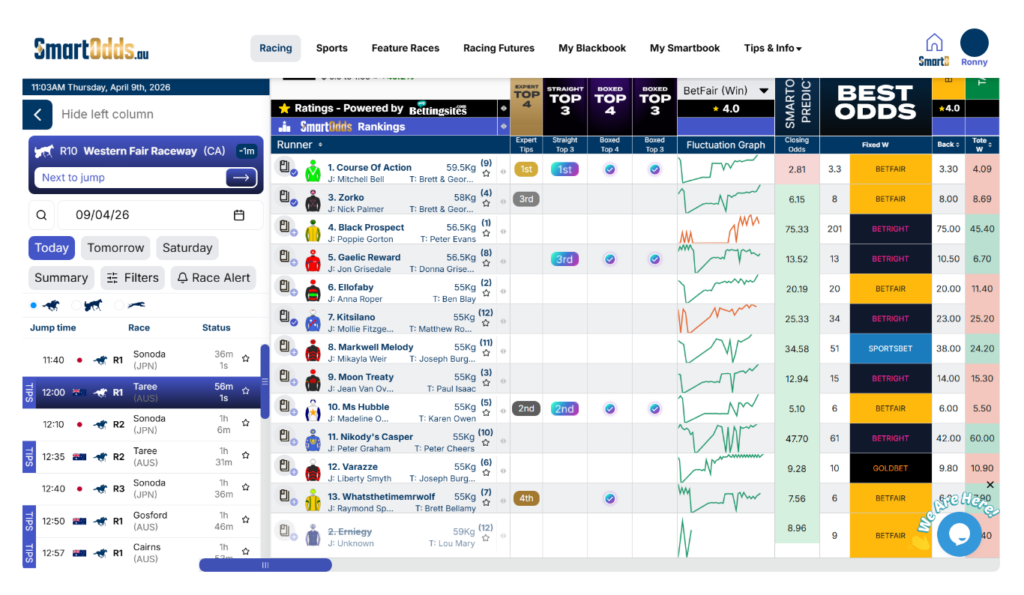
SmartOdds offers a variety of live data to keep you up to date with the latest market movements so you can make the best bet. This guide shows you how to access odds fluctatations for runners by bookmaker.
To see odds fluctuations:
- Navigate to any race in the left column
- Click ‘Layout’ in the race navigation section
- Select ‘Default All’, ‘Default Win’ or ‘Default Place’
A Flucs Graph will appear to the right of the Expert Tips column. Here you can see a line graph of recorded price movements for every runner. By default, the view is for all changes for BetFair.
To see the recorded price movements:
- Hover over any data point in the graph
In the hover overlay, you will see the recoded price, day and time.
To see price fluctuations by bookmaker:
- Hover over odds cell in the odds comparison table
In the overlay, you will see the recorded price by time and day in a data list view and graphically in a line graph.
See odds fluctuations by bookmaker
To change the bookmaker, click on the bookmaker dropdown and select your preferred bookmaker.
Change the odds fluctuation frequency
To change the frequency of the displayed odds fluctuations, click on the ‘All’ dropdown and select your preferred frequency.