

SmartOdds provides expert tips for most to all upcoming major horse racing events.
There are no ‘Tips’ in the left column
The purple tips marker on each race signifies that our analysts have left their tips for a race. If there is no purple tips marker, there are no tips for that race. Note that our analysts specialise in horse racing, so you may not always see tips for greyhound and harness races.
There is no Expert Tips column in the odds comparison table
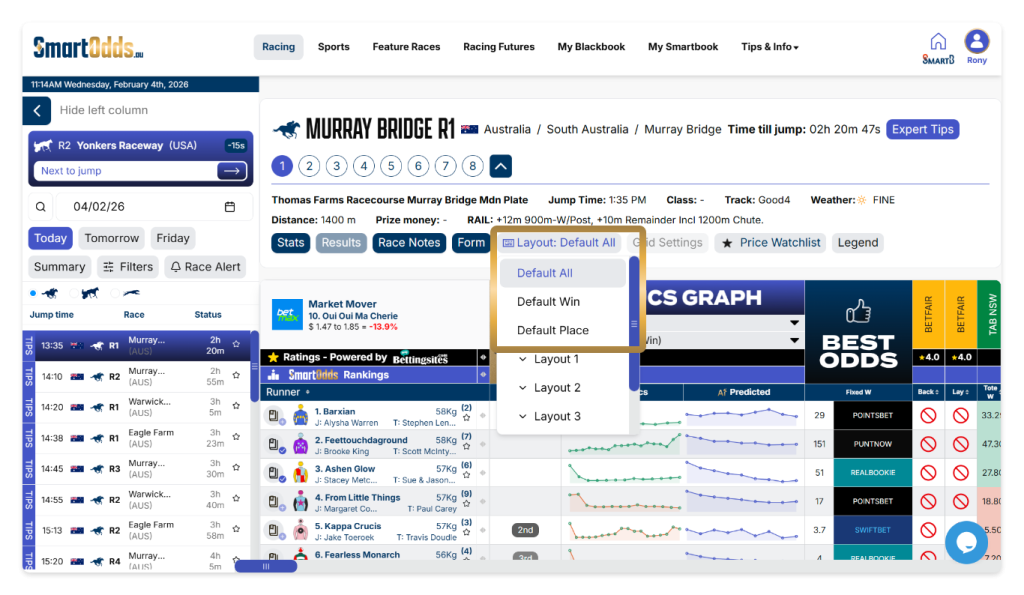
If you cannot see the expert tips column in the odds comparison table for a race marked with tips, ensure you have seleted a layout that includes Expert Tips. By default, ‘Default All’, ‘Default Win’ and ‘Default Place’ all include expert tips in the left most column.
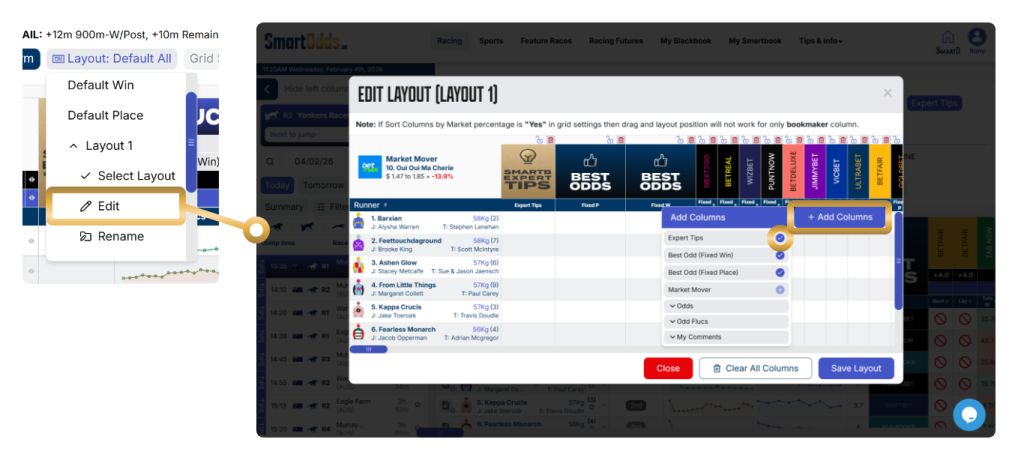
To add expert tips to a custom layout:
- Click ‘Layout’ in the race navigation section
- Select any custom layout 1-5
- Click ‘Edit’
- In the Edit Layout overlay, click the ‘+Add Columns’ button
- Click the checkmark next to ‘Expert Tips’
- Click ‘Save Layout